Ingrid Vault · Private document library

Every document, found and understood.

Contracts, certificates and invoices kept private to your company, filed and named for you, with the facts Ingrid read cited back to the page and quote.

The real Vault screen · sample data · nothing you do here is saved
Book a demo
vault.ingrid-app.com/library
Ingrid Vault library with a document open and the facts Ingrid read from it.

The real Vault screens, live in your browser with sample data.

Privacy
Per companyYour documents are private to your company and nobody else’s.
Facts
CitedEvery fact keeps the page and quote it came from.
Search
Keyword + meaningWith fact filters such as renews:<90d.
Access
ConfirmedWidening who can see a document always asks first.
How Vault works

Drop it in. Vault does the filing.

Ingrid reads each document, sorts it, extracts the facts with their sources and files it, while a person confirms anything uncertain.

  1. UploadDrag in, phone capture, or from Payables and Bank Rec
  2. ProtectPrivate to your company
  3. ReadClassified and facts extracted with quotes
  4. ReviewA person confirms what is uncertain
  5. FindSearch, Ask Ingrid, Upcoming
Vault, in the product

A library that reads.

Scroll through the real Vault screens.

  1. 01 Library

    Filed and named for you.

    Every document classified into one of fifteen types and given a consistent name, linked to its vendor or customer.
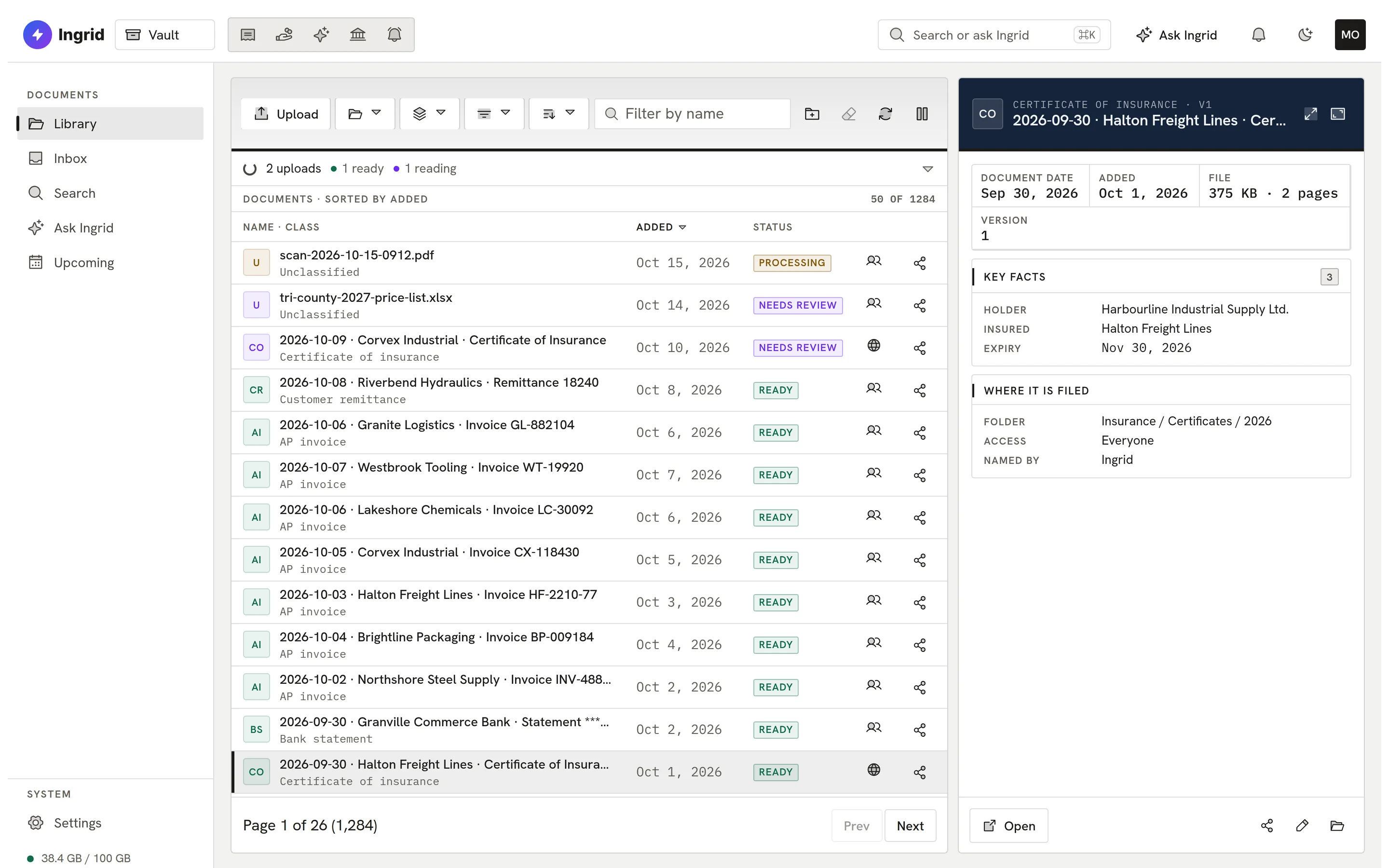
    Vault library.
  2. 02 Facts

    Facts with their source.

    Ingrid extracts the facts that matter, each with the page and quote it came from. Tax IDs and account numbers are masked.
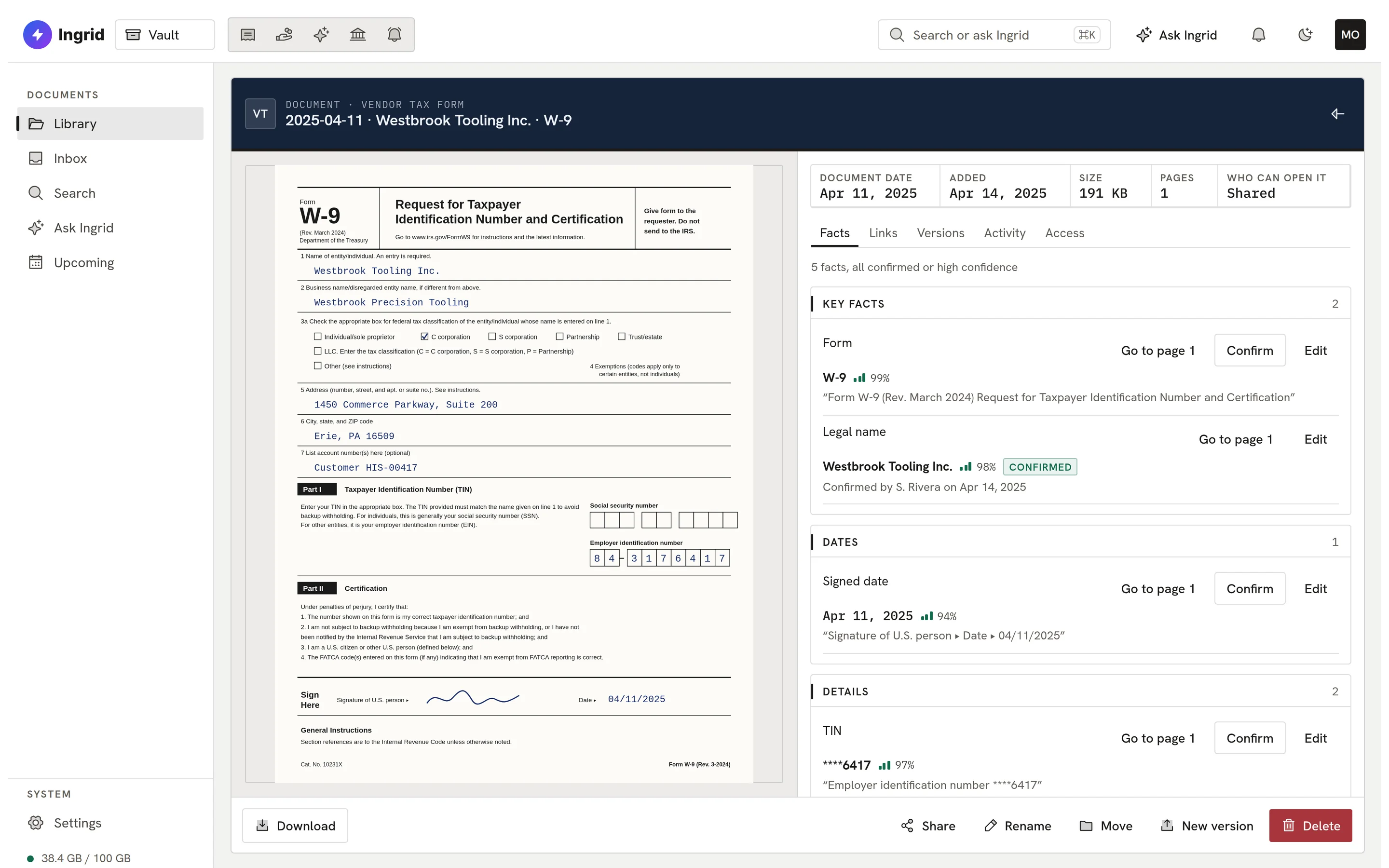
    A document with cited facts.
  3. 03 Review

    People confirm what is uncertain.

    The Review Inbox collects anything Ingrid is unsure of. A confirmed fact is never overwritten when the document is read again.
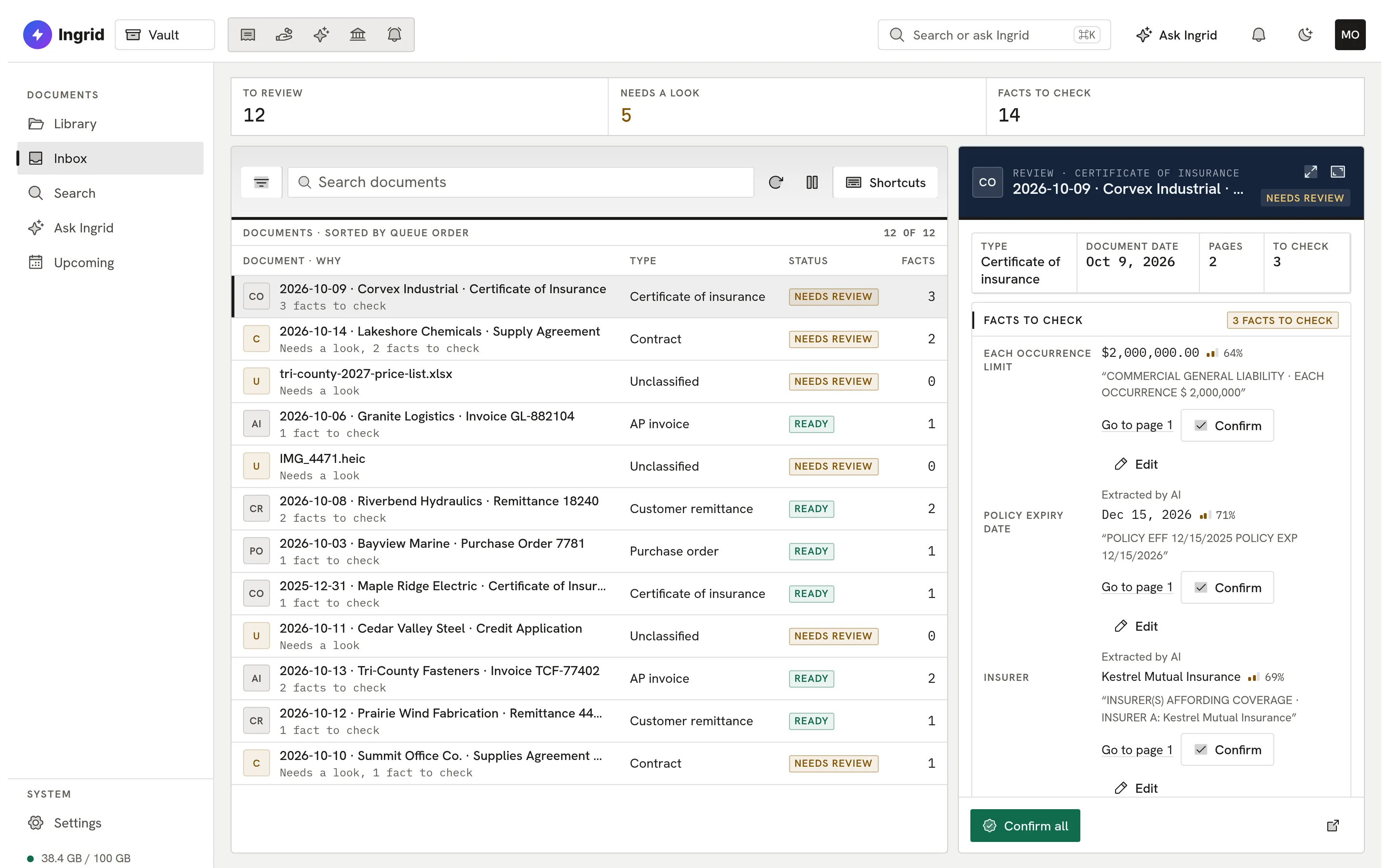
    Vault review inbox.
  4. 04 Search

    Search by what it says.

    One box for keywords and meaning, with fact filters like renews:<90d and results you are allowed to see.
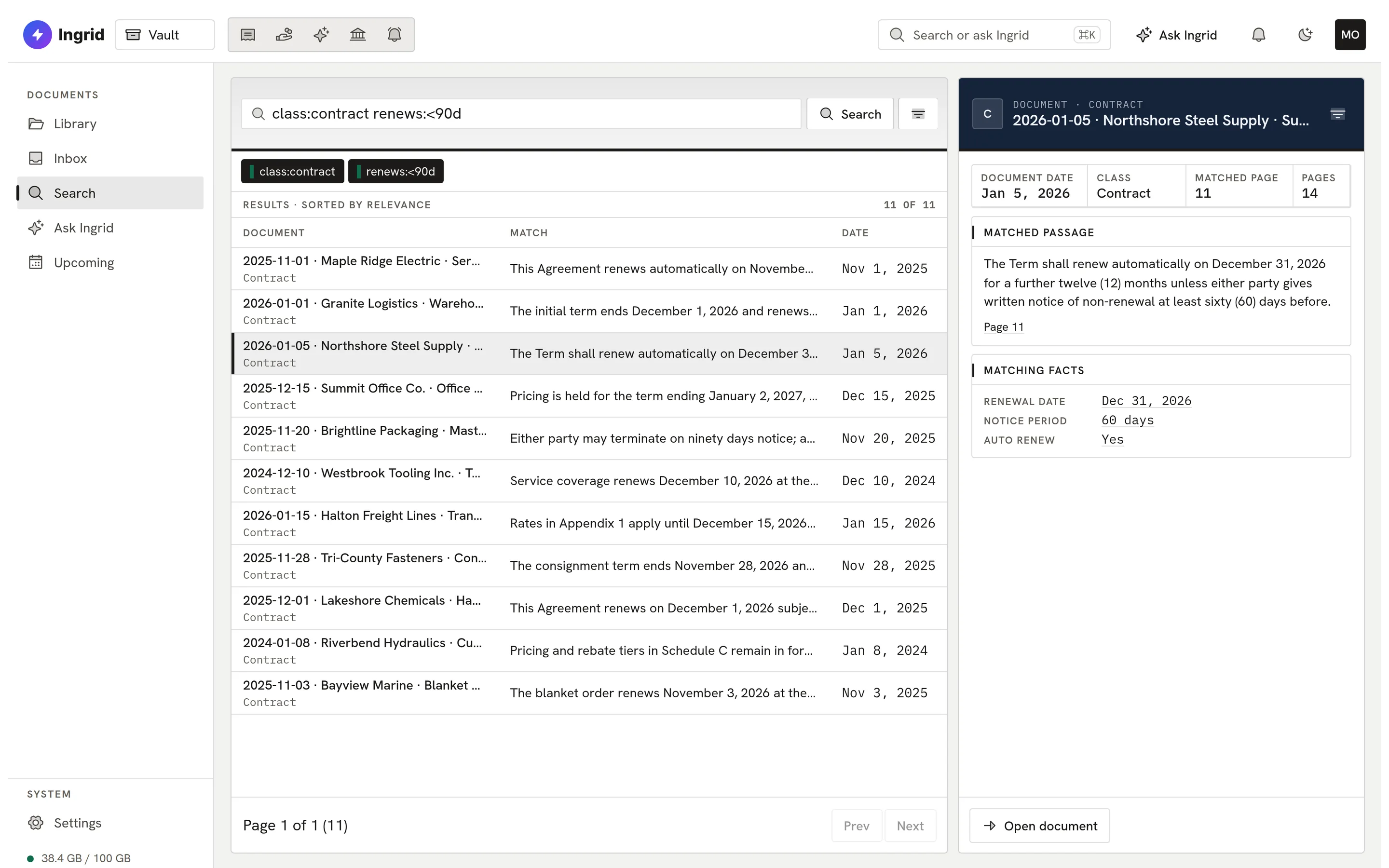
    Vault search with fact filters.
  5. 05 Ask

    Answers with citations.

    Ask Ingrid answers from your documents, cites every claim, and refuses when the documents don’t support an answer.
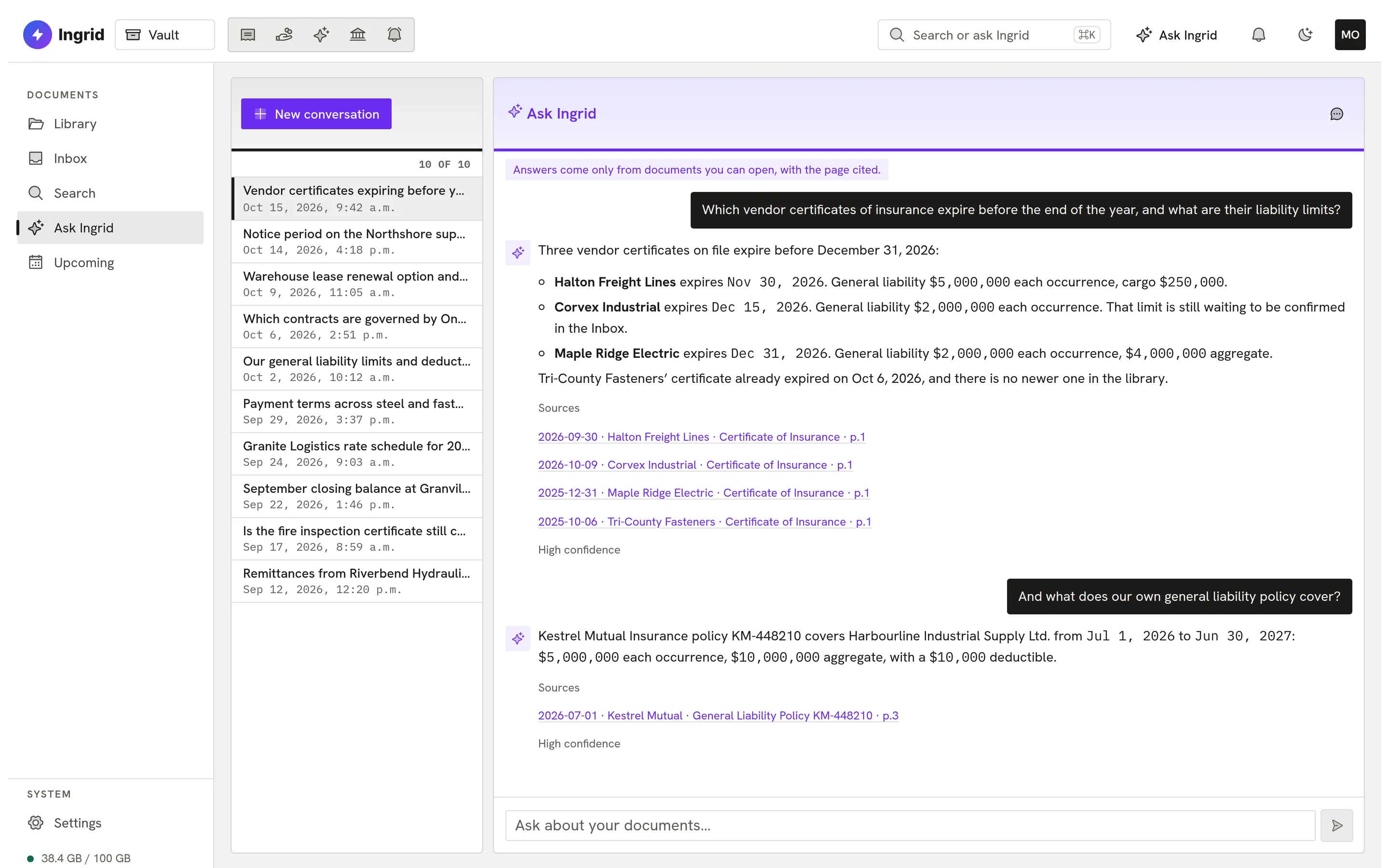
    Ask Ingrid in Vault with cited answers.
  6. 06 Upcoming

    Renewals before they surprise you.

    Renewal and notice dates in one view, plus active vendors missing a certificate of insurance.
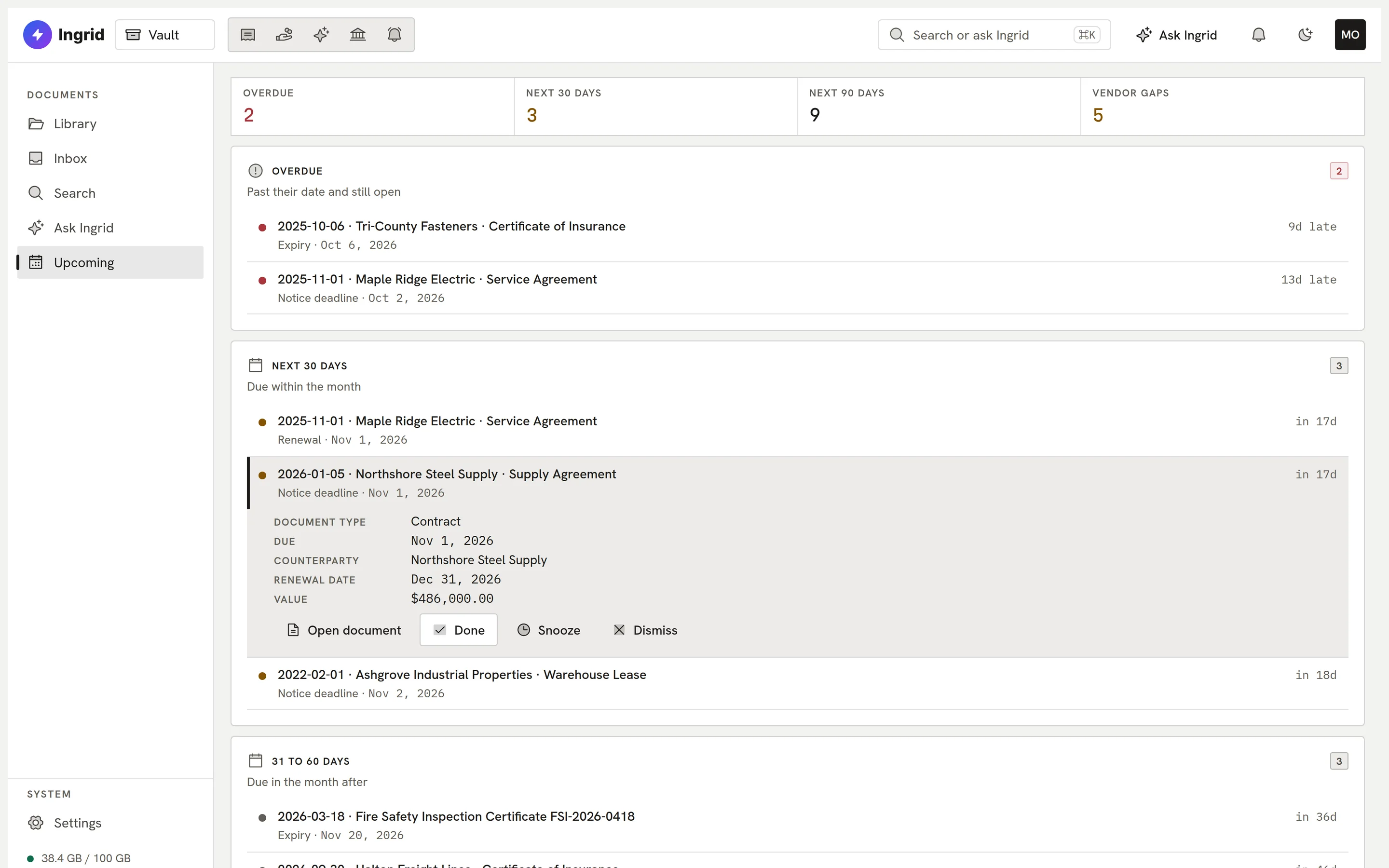
    Vault upcoming renewals.
vault.ingrid-app.com/library
Vault library.
Playground

Try Vault. Search, open, ask.

The real Vault screens with sample documents, in your browser.

vault.ingrid-app.com/library
Documents, filed

This is the real Vault screen running in your browser with sample data. Click anything; nothing is saved and nothing leaves the page.

Built to be trusted

Private by design. Useful by default.

Privacy, permissions and a record of who did what run underneath; reading, filing and finding run on top.

  • Private by default

    Every file, and the text Ingrid reads from it, is private to your company.

  • Reads and files

    Classifies each document, names it and links it to the vendor or customer.

  • Cited facts

    Facts keep their page and quote; sensitive numbers are masked.

  • Hybrid search

    Keyword and meaning together, with fact filters and match reasons.

  • Ask, with citations

    Answers cite every claim and only use documents the asker can open.

  • Upcoming

    Renewals, notice dates and missing certificates in one view.

  • Sharing and roles

    Only me, shared or everyone, with departments, roles and sealed folders.

  • Access log

    Every view and download recorded; revocation is immediate.

On a phone

The library, in your pocket.

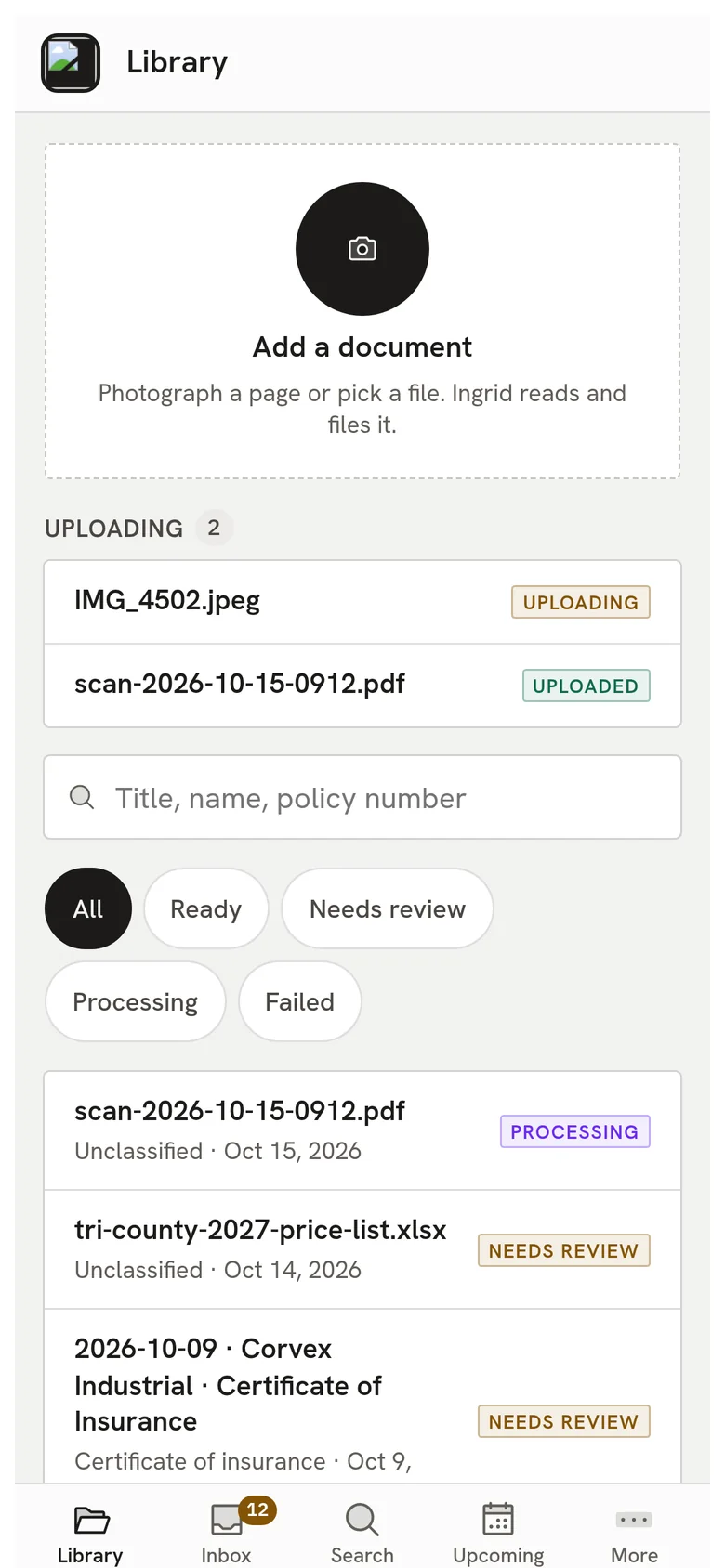
Vault has a phone layout for finding a document, reading what Ingrid found in it and capturing a new one with the camera.

  • Search and open any document you are allowed to see.
  • Photograph a document straight into the library.
  • The same permissions as on the desktop.
Ingrid Vault on a phone: the library with recent documents.
Everything Vault does

The complete list. No asterisks.

All 76 capabilities, each checked against the product as it ships today. Anything still being built is marked.

Showing 76 of 76 features

Upload and intake08

  • Drag-and-drop uploadDrop files into the Library or a folder to upload them, with a progress queue.
  • Phone captureOn a phone, a capture button takes a photo or picks a PDF and uploads it straight into Vault.
  • File checks on the way inFiles are identified by their actual content, not their name, and executables or macro files are refused.
  • Duplicate detectionAn exact copy of a file already stored is linked to the existing document instead of being stored twice.
  • Document versionsUpload a new version of a document and earlier versions are kept.
  • Bulk onboarding importExisting documents can be imported in bulk, with their reading counted against a separate onboarding import allowance.
  • AP and Bank Rec files collectedDocuments uploaded or emailed into Ingrid AP and bank statements in Ingrid Bank Rec are registered with Vault and copied in, privately, when the company has Vault.
  • Documents waiting on day oneBecause AP and Bank Rec files are registered before purchase, a company that adds Vault finds them adopted within about ten minutes.

Reading, naming and filing10

  • Reads text and scansVault reads the text layer of a PDF and uses Ingrid to read scanned PDFs and photos page by page.
  • Automatic classificationEach document is sorted into one of 15 types, such as contract, lease, insurance policy, certificate of insurance, W-9 or bank statement.
  • Cited fact extractionKey facts for each type, such as parties, dates, limits, amounts and renewal terms, are extracted with the page and quote they came from.
  • Validated, never guessedExtracted values are checked against a strict schema and anything that fails is dropped rather than guessed.
  • Sensitive numbers maskedTax IDs and account numbers are stored masked in facts; the full value stays only inside the private file.
  • Consistent automatic namesDocuments are renamed from their own facts, for example date, counterparty and document type, and a name you set yourself sticks.
  • Filing rulesYour company's filing rules decide the folder first, then the default folder for the document type.
  • Vendor and customer linkingDocuments are linked to the matching vendor or customer record Ingrid already holds for your company.
  • Prompt-injection resistanceDocument text is passed to Ingrid only as quoted data, and text that tries to instruct Ingrid is flagged.
  • Classify from source appIn developmentDocuments arriving from another Ingrid app are classified using where they came from as a hint.

Review and facts05

  • Review inboxUnsure classifications and low-confidence facts collect in one Inbox to confirm or correct, with keyboard shortcuts.
  • Bulk approve reviewsSelect several review items and confirm them together.
  • Confirm or edit any factA person can confirm or correct a fact, and that value outranks Ingrid and is never overwritten by re-reading.
  • Confidence on every factEach extracted fact shows how confident Ingrid was.
  • Fact history keptAn edit creates a new fact and keeps the earlier value in history.

Library and documents09

  • Folders and library tableBrowse documents by folder in a dense table with type, key facts, date and status.
  • Document view with factsPreview a PDF or image beside its facts, links, versions and activity.
  • Highlighted source passageClick a fact to jump to its page with the source passage highlighted.
  • Bulk moveSelect several documents and move them to another folder at once.
  • TagsIn developmentTag documents to group them across folders.
  • Trash and restoreDeleted documents go to a recoverable trash.
  • Keep in VaultMark a document to keep in Vault even if the app it came from deletes its copy.
  • Command paletteA Cmd+K palette jumps to screens, documents and actions.
  • Phone layoutLibrary, Inbox, Search, Ask, Upcoming and Settings have dedicated phone screens.

Search04

  • Hybrid searchOne search box combines exact keyword matching with meaning-based search.
  • Fact filters in searchType filters such as class:contract renews:<90d or total:>5000 to search by extracted facts.
  • Snippets and match reasonsResults show a highlighted snippet and why each document matched.
  • Permission-safe resultsSearch only ever returns, counts or quotes documents the searcher can open.

Ask Ingrid08

  • Ask questions in VaultAsk a plain-English question in a side panel or on the Ask page and get an answer drawn from your documents.
  • Every answer citedAnswers cite the document and page, and the citation opens the source.
  • Refuses rather than guessesIf nothing in the documents supports an answer, Ingrid says so instead of guessing.
  • Answers as the askerIngrid answers using only documents the person asking is allowed to open.
  • Ask about one documentAsk a question scoped to the document you are looking at.
  • Private conversation historyPast questions and answers are kept private to your company, and can be reopened or deleted.
  • Vault in Ask IngridAsk Ingrid can search Vault, read facts and passages and answer with citations, with the asker's permissions.
  • Ingrid suggests moves and renamesComingIngrid proposes moving, renaming or tagging documents, applied only after you confirm.

Upcoming and compliance05

  • Upcoming deadlinesRenewals, expiries, notice deadlines and payment due dates found in documents are listed by how soon they fall.
  • Done, snooze or dismissMark a deadline done, snooze it for some days, dismiss it or reopen it.
  • Missing COI and W-9 gapsShows active vendors with no certificate of insurance or tax form on file, or an expiring certificate.
  • W-9 re-certification reminderSuggests re-certifying a W-9 36 months after it was signed, and tracks the legal expiry of W-8 forms.
  • Deadlines sent to Ingrid AlertComingVault deadlines feed Ingrid Alert notifications.

Sharing and permissions09

  • Only me, Shared, EveryoneSet each folder or document to private, shared with named departments or people, or open to everyone, at view or edit.
  • DepartmentsAdministrators create departments such as Finance, HR or Legal and share with them as a group.
  • Admin, Member, Viewer rolesViewers can only read; Members upload and organise; Admins manage access, rules and settings.
  • Who has accessSee who can open a folder or document before and after you share it.
  • Confirm before widening accessMoving or sharing a document so more people can open it asks for confirmation first.
  • Sealed foldersContents of a sealed folder are never sent to Ingrid: no reading, extraction, meaning search or Ask Ingrid, and still stored privately.
  • Shared with meA filter shows documents others have shared with you.
  • Immediate revocationRoles and memberships are checked on every request, so removing someone takes effect at once.
  • One permission check everywhereThe same access rules apply to screens, search, downloads, deadlines and Ask Ingrid.

Security, privacy and audit11

  • Private to your companyEach file gets its own key, locked by a company key, which is locked by a master key kept as a server secret.
  • Extracted text kept private tooExtracted text, search results, Ask Ingrid conversations and sealed facts are private to your company as well.
  • Privacy statusSettings shows the active company key version and when it was last rotated, never the key itself.
  • Key rotationIn developmentYour company’s keys can be renewed without re-uploading files.
  • Crypto-shred on offboardingIn developmentDestroying a company's keys makes all its stored files permanently unreadable.
  • Access logEvery view, download and Ask Ingrid citation of a document is logged, shown as activity on the document.
  • Sharing audit historyShares, moves, sealing, department and role changes are recorded, and admins can review them in Settings.
  • Admin access loggedWhen an administrator opens a document an ordinary member could not, that is recorded.
  • Separated by companyEverything in Vault belongs to one company and is never visible to another.
  • Legal holdIn developmentA document under legal hold cannot be deleted.
  • Retention policiesComingKeep or purge documents by type after a set number of years.

Usage and settings04

  • Usage metersAdmins see storage used, pages left this month, onboarding import progress and documents waiting.
  • Over-allowance handlingDocuments over the monthly reading allowance are still stored and keyword-searchable, and are processed next cycle in order.
  • Included with Ingrid LawIn developmentA company with Ingrid Law gets Vault included, with a monthly page-reading allowance.
  • Works inside Ask IngridVault opens as the Documents workspace inside Ask Ingrid with the same sign-in.

ERP support03

  • Works with any ERPVault holds company documents and does not depend on which ERP you run.
  • Works with SpireWorks alongside your Spire company.
  • AccountMate supportComingAccountMate support is coming soon.

Bring your documents into the light.

Tell us what your team keeps where today. We will show you how Vault files it, finds it and keeps it private.

Book a demo