
Ingrid Alert · Business alerts for SpireAlert Lite is free

Know first. Act once.

Plain-English alerts on the numbers that need someone today, a 13-week cash forecast and controls checks, read straight from Spire. Alert Lite is free.

The real Alert screen · sample data · nothing you do here is saved
Book a demo
alert.ingrid-app.com/dashboard
Ingrid Alert overview: open alerts, live Spire figures and the alert feed.

The real Alert screens on the new Ingrid design, live in your browser with sample data.

Free to use
Alert LiteAlert inside Ingrid, with the inbox, dashboards, insights and cash forecast.
Works with
SpireRead-only; Alert never writes to your ERP. AccountMate support coming soon.
Ready-made
22 alertsPlus alert packs for six roles, switched on in a click.
Cash
13 weeksA cash forecast and eight controls checks, read-only.
How Alert works

Watching, so you don’t have to.

Alert reads your books on a schedule, checks each condition in plain English, and puts what fired in an inbox someone owns.

  1. ReadsSpire, read-only
  2. ChecksConditions written in plain English
  3. FiresInto an inbox, with severity
  4. OwnedAssign, snooze or resolve
  5. DeliveredEmail, text, Slack, Teams
Alert, in the product

From signal to someone acting on it.

Scroll through the real Alert screens.

  1. 01 Overview

    What needs attention, at a glance.

    Open alerts, live figures from your ERP and the feed of what fired, with freshness shown on every board.
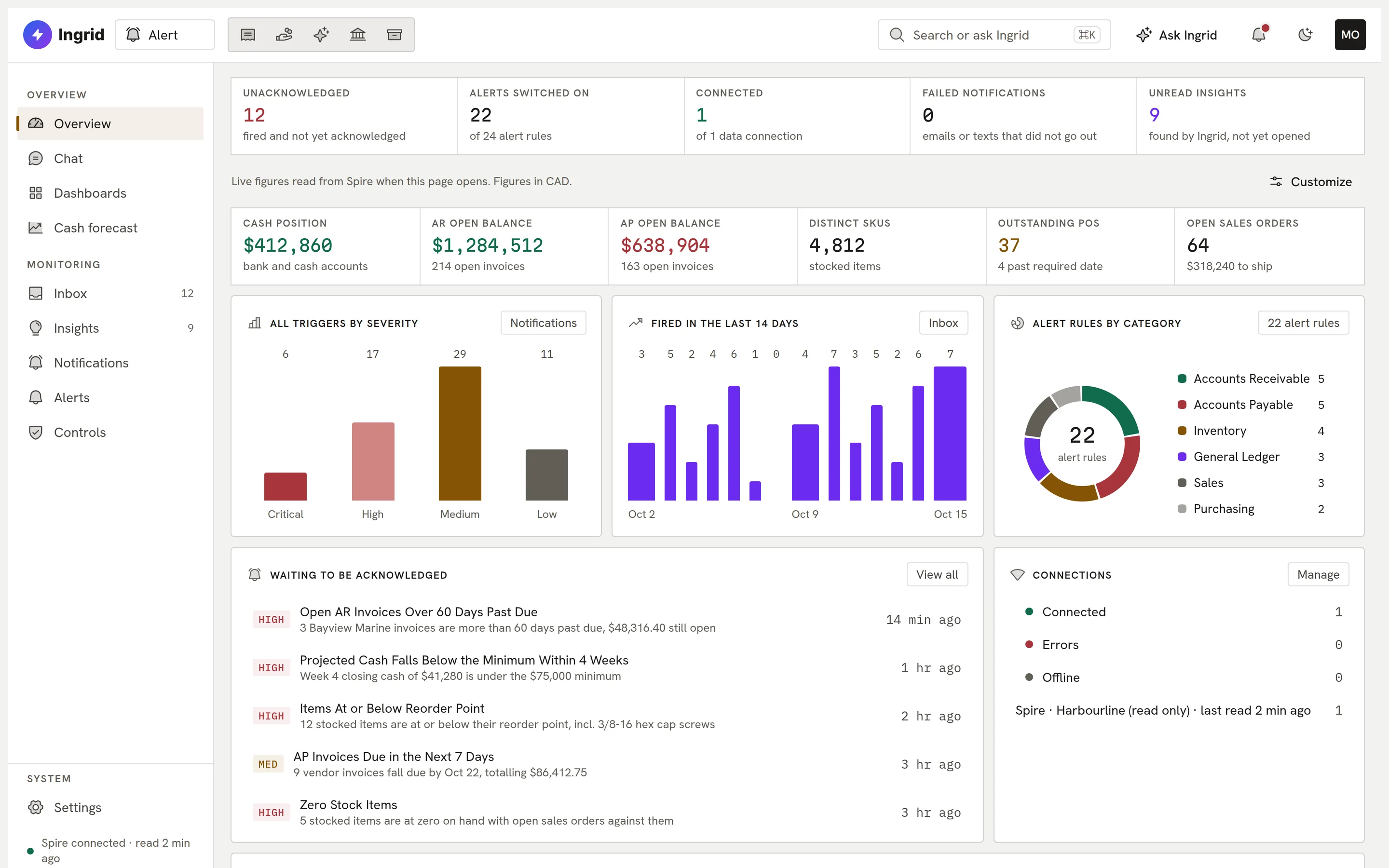
    Alert overview.
  2. 02 Inbox

    Every alert has an owner.

    Fired alerts land in an inbox where they are assigned, snoozed or resolved, singly or in bulk.
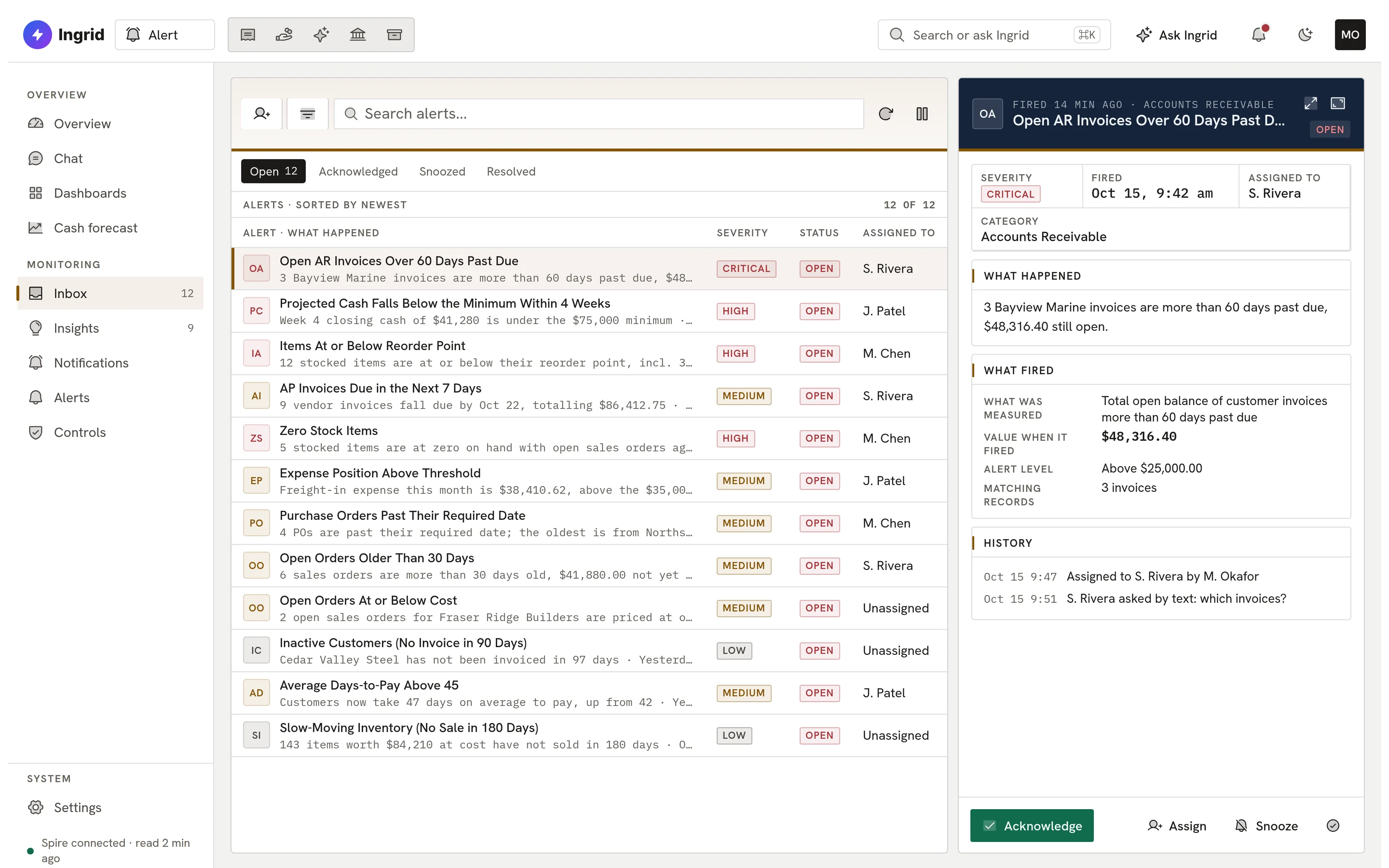
    Alert inbox.
  3. 03 Cash

    Thirteen weeks ahead.

    A read-only cash forecast from your receivables and payables, with an alert when cash would dip below your minimum.
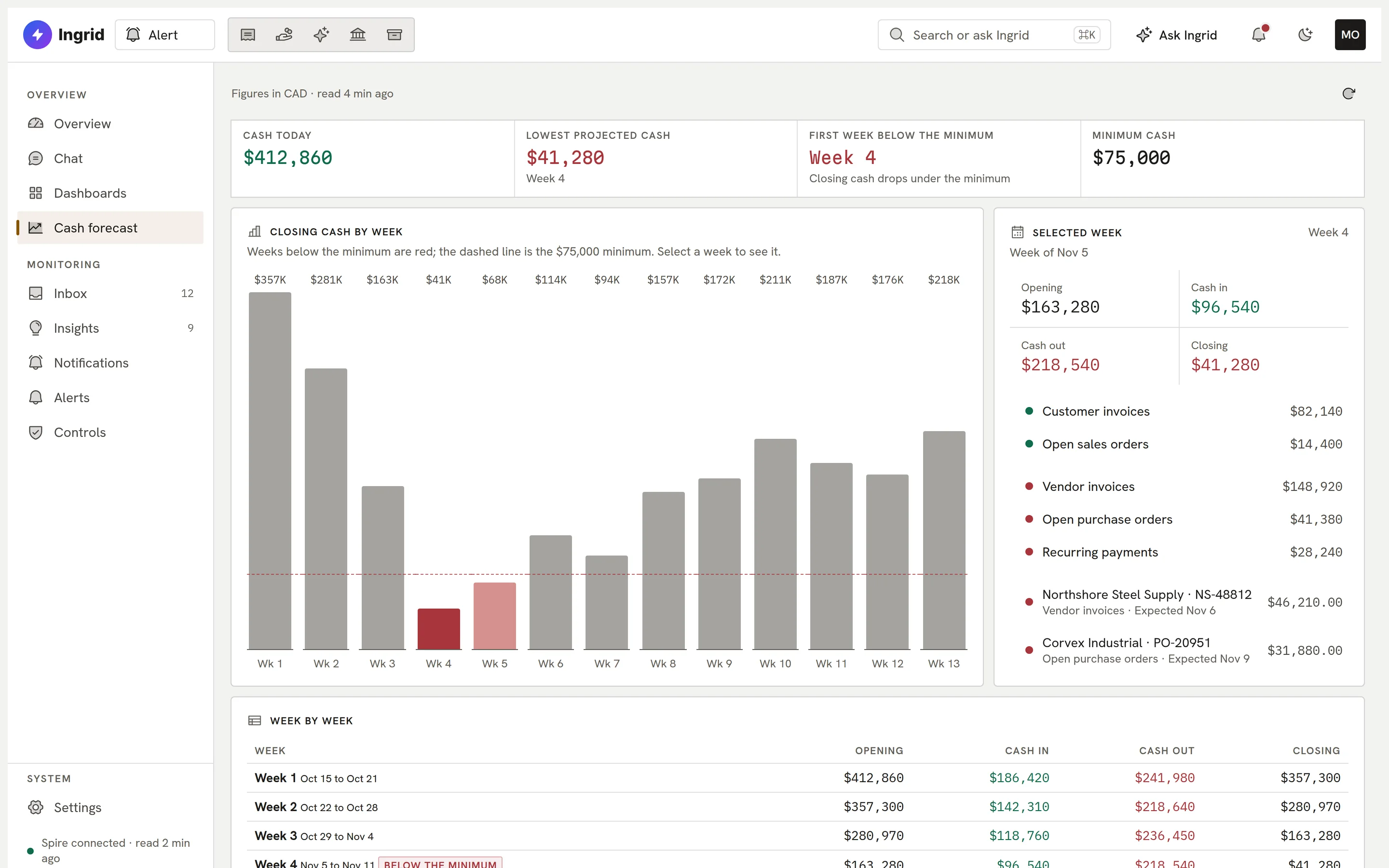
    Alert 13-week cash forecast.
  4. 04 Controls

    Controls checks that never sleep.

    Eight fraud and controls checks, such as possible duplicate vendor invoices, flagged for review and never acted on automatically.
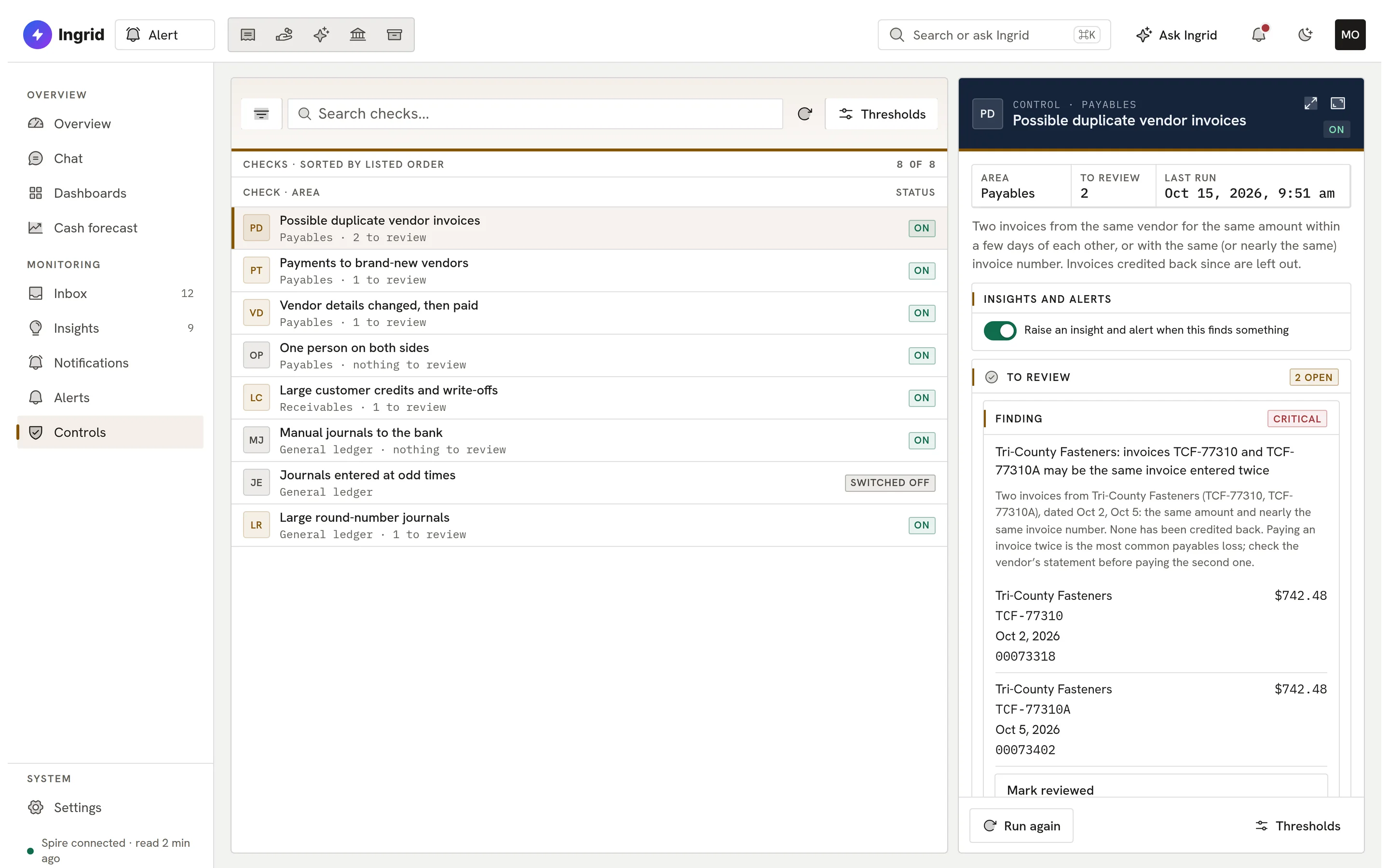
    Alert controls checks.
  5. 05 Insights

    Unusual activity, explained.

    Insights that learn your normal, plus customer and vendor risk findings in a feed you can triage.
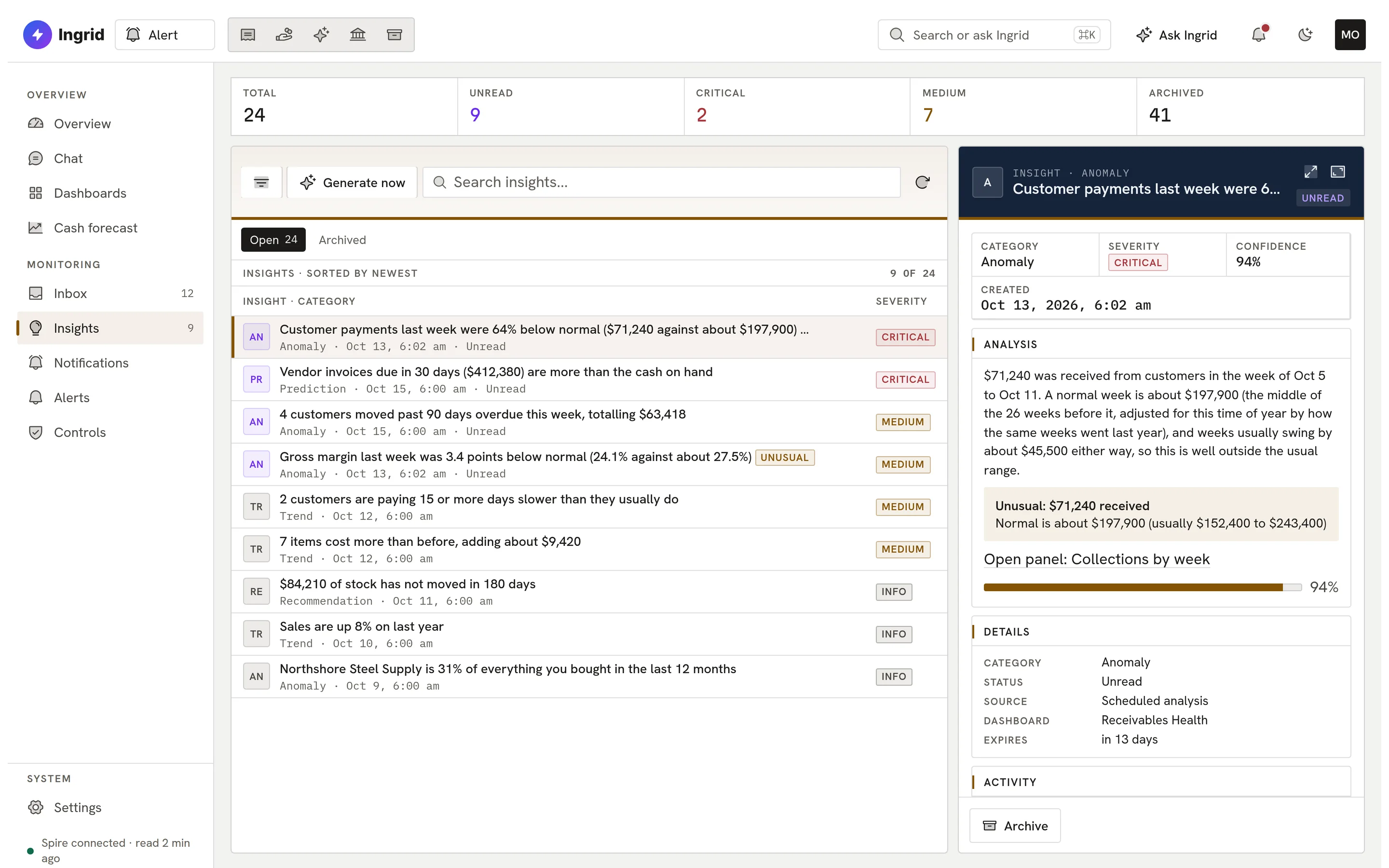
    Alert insights.
  6. 06 Describe

    Describe an alert in a sentence.

    Type what you want to watch and Ingrid drafts the alert for you to check and switch on.
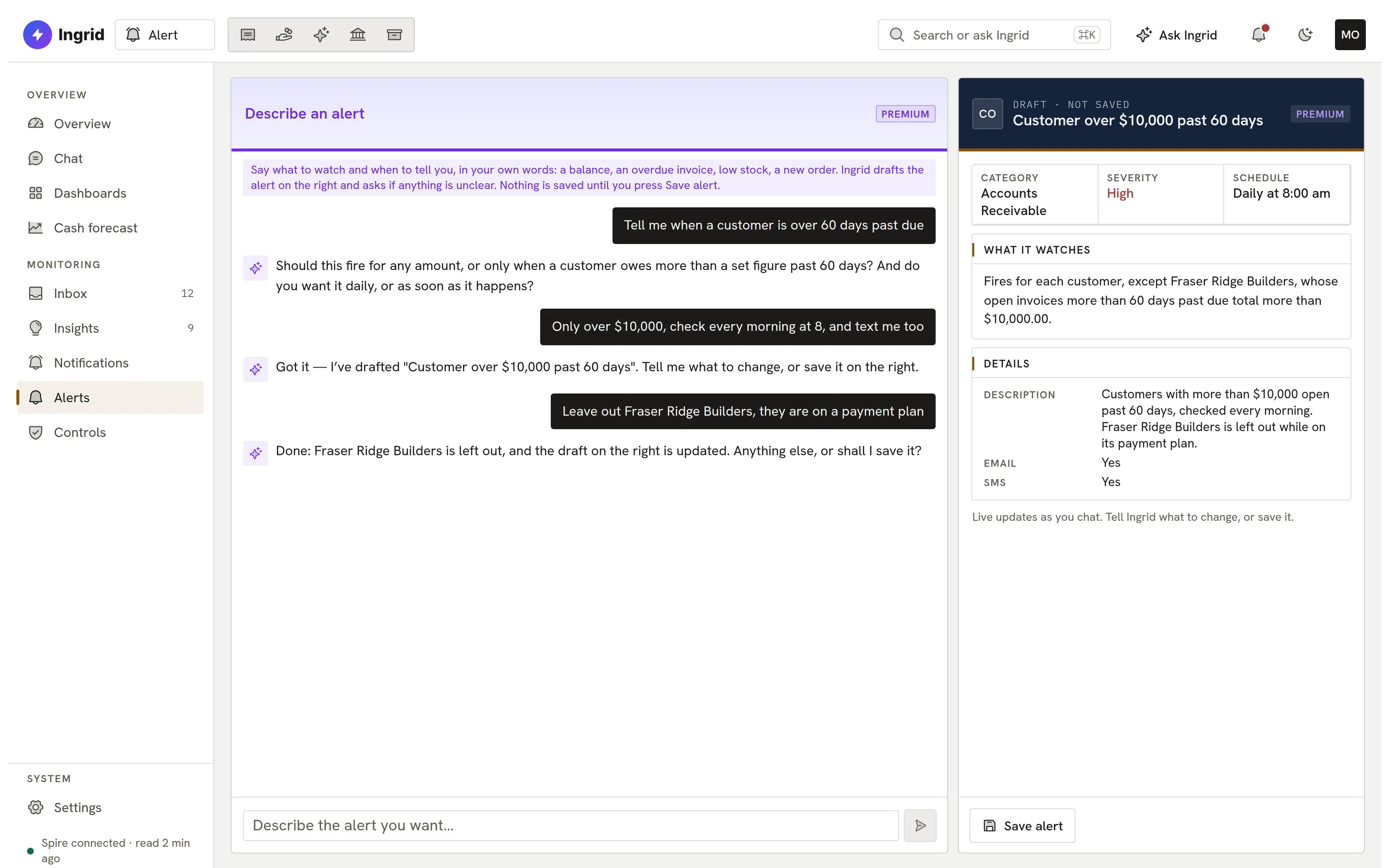
    Describe an alert in a sentence.
alert.ingrid-app.com/dashboard
Alert overview.
Playground

Try Alert. Click anything.

The real Alert screens with sample data, in your browser.

alert.ingrid-app.com/dashboard
Alerts and live figures

This is the real Alert screen running in your browser with sample data. Click anything; nothing is saved and nothing leaves the page.

What Alert watches

The whole business, in plain English.

No table names, no codes: every alert reads like a sentence.

  • Ready-made alerts

    22 alerts and packs for six roles, across six business areas.

  • Plain-English conditions

    Each condition reads back as a sentence, with warnings when it looks wrong.

  • Dashboards and reports

    Nine ready-made dashboards, a report catalog, and PDF, Excel or CSV export.

  • Insights

    Unusual activity that learns your normal, and customer and vendor risk.

  • Cash forecast

    Thirteen weeks ahead, with a cash-below-minimum alert.

  • Controls checks

    Eight fraud and controls signals flagged for review, read-only.

  • Ask Ingrid

    Ask about your numbers from inside Alert; Lite includes a monthly question allowance.

  • Read-only, always

    Alert reads Spire and never writes to it.

Everything Alert does

The complete list. No asterisks.

All 59 capabilities, each checked against the product as it ships today. Anything still being built is marked.

Showing 59 of 59 features

Watch your books11

  • Alert Lite is freeAlert Lite, Alert inside Ingrid, is free to use: the inbox, dashboards, insights, cash forecast and controls checks.
  • Ready-made alert templatesStart from 22 built-in checks such as invoices 60 days past due, items at reorder point, POs past their required date and cash below a threshold.
  • Alert packs by roleSwitch on a set of alerts made for the owner, controller, collections, purchasing, warehouse or sales, with no duplicates when packs overlap.
  • Alerts across six business areasAlerts cover receivables, payables, inventory, the general ledger, sales and purchasing.
  • Daily, weekly, monthly or custom schedulesEach alert checks on a daily, weekly, monthly or custom cron schedule in the company's time zone, and a missed check catches up.
  • Fire on changeAn event-driven alert is checked every five minutes and fires only when a condition goes from fine to breached.
  • Severity levels and cooldownsAlerts carry low, medium, high or critical severity and wait a set time before firing again while still breached.
  • Plain-English condition readoutEvery alert says in words what it is watching, and a fired alert explains the measured figure against its threshold.
  • Wrong-condition warningsAlert flags a saved condition that probably watches the wrong thing and offers the fix, never changing it silently.
  • Connector health and check statusEach alert shows when it was last checked and why a check failed, and the company is told once when its connector goes offline and when it is back.
  • Multi-currency money in home currencySpire documents in foreign currency are converted at the rate Spire booked them, so totals are in home currency.

Build your own alerts05

  • Describe an alert in a sentenceType what you want watched and Ingrid drafts the alert, asks clarifying questions, and you refine it in chat before saving.
  • Visual condition builderBuild or edit an alert's rule field by field on the new-alert form, without writing a query.
  • Custom alert categoriesCreate your own categories to organise alerts beyond the built-in areas.
  • Custom email and text wordingAn alert can carry its own email and text template with placeholders for the measured figures.
  • Adjustable thresholdsSettings holds the company's own numbers for what counts as overdue, unusual or risky, each finding with its own switch.

Delivery and two-way alerts12

  • In-app inbox for fired alertsFired alerts land in one inbox as work items you can acknowledge, assign, snooze, resolve with a note or reopen, with full history.
  • Bulk acknowledgeAcknowledge many fired alerts at once from the inbox.
  • In-app alert inboxAlerts that fire are delivered to an in-app inbox with read and unread state; delivery by email, text, Slack or Teams is set per alert.
  • Email alertsAlerts are emailed with the measured figures in plain words, with delivery and bounce receipts recorded.
  • Text message alertsAlerts can be sent by SMS, with delivery receipts and STOP opt-out honoured.
  • Slack and Microsoft TeamsPost fired alerts to a Slack or Teams channel by webhook, with a minimum severity per channel and a test button.
  • One-tap actions in email and textEach alert email and text carries signed links to acknowledge, snooze for a day or resolve, valid for 7 days.
  • Reply to an alert textReply ack, snooze or stop by text, or ask a question and Ingrid answers by text with the alert as context.
  • Reply to an alert emailReplies to an alert email from the original recipient are acted on or answered, tied to the alert by a signed reply address.
  • Escalation to backup recipientsIf a fired alert is still unacknowledged after a set number of hours, it is sent once to backup recipients.
  • Quiet hours and digestsEach person sets quiet hours and can get a daily or weekly digest email instead of one email per alert; critical alerts can still break through.
  • Default recipientsCompany-wide default recipients for alerts and insights by email or text, plus per-insight recipients and insight emails.

Morning brief03

  • Morning briefA short brief at 07:00 each person's time on weekdays: cash position, how the books moved, overdue items, alerts that fired and new insights.
  • Figures, not guessesEvery number in the brief is read from the same reports a dashboard shows; nothing in it is written by a model, and an unreadable figure is marked unavailable.
  • Brief settings and previewChoose daily or weekly, the sections you want, what happens on a quiet day, and send yourself a preview.

Dashboards and reports12

  • Ready-made dashboardsNine starter boards: Cash and Liquidity, Receivables Health, Payables and Cash Out, Sales Pulse, Inventory Health, Purchasing, GL Snapshot, Customers at Risk and Vendor Watch.
  • Live metrics on the overviewThe overview shows a personal row of live figures read from the ERP.
  • Your own overview tilesEach person arranges their own overview tiles.
  • Built-in report catalogDozens of reports such as receivables and payables aging, DSO, DPO, sales by month, gross margin, dead stock, inventory turns, late POs and budget vs actual.
  • Dashboard designerDescribe a dashboard and Ingrid builds it; every panel is test-run on your live data before it can be saved, or the request is declined with alternatives.
  • Edit, add and arrange panelsAdd, edit, remove and rearrange panels on a board's grid.
  • Share and pin dashboardsShare a board with the company or named people, pin boards to the sidebar and pick a home board.
  • Export to PDF, Excel or CSVDownload a dashboard or one panel as a styled PDF, an Excel workbook or a CSV, stamped with when the figures were read.
  • Scheduled report emailsEmail a dashboard as a PDF or Excel file daily, weekly or monthly, at the send time on each recipient's own clock, with unsubscribe.
  • Freshness shown on every boardBoards refresh in the background and say when each figure was read.
  • Ask a dashboardAsk a question about a board, or have Ingrid analyse it into insights.
  • Phone layoutThe alert inbox and dashboards have a phone layout.

Insights and analysis05

  • Automatic insightsAlert reads the books and writes plain-English findings such as seriously overdue receivables, sales vs last year, margin change, dead stock, stockouts, late POs, cash short for invoices and expenses over budget.
  • Unusual activity that learns your normalSales, margin, invoices, collections, returns, vendor invoices and payments each learn their own normal from two years of history and flag weeks far outside it, with no setup.
  • Customer and vendor riskFindings for credit exposure, customers paying slower or buying less, customer concentration and vendor price creep.
  • Insight feed with triageRead, dismiss, archive or revive insights, and generate a fresh set on demand.
  • Ask Ingrid about your numbersAsk questions in plain English on the overview or the Chat page, within a monthly question allowance on Lite; answers come from measured figures read through typed tools.

Cash and controls06

  • 13-week cash forecastA rolling 13-week forecast of cash in and out built from open invoices, orders, POs, customer payment habits and recurring payments found in history.
  • Editable forecast assumptionsAdjust recurring payments and other choices behind the forecast and set a minimum cash level.
  • Controls on or offTurn each built-in controls check on or off for your company.
  • Cash below minimum alertA built-in alert fires when projected cash falls below your minimum within a chosen number of weeks.
  • Controls and fraud signalsEight checks: possible duplicate vendor invoices, payments to brand-new vendors, vendor details changed then paid, one person on both sides, large customer credits and write-offs, manual journals to the bank, journals at odd times, large round-number journals.
  • Review flagged itemsMark each flagged item reviewed with a reason, reopen it, and switch individual checks on or off.

Security and administration03

  • Short, configurable cacheToday's figures are cached 15 minutes by default (past periods 24 hours), adjustable per company between 1 minute and 24 hours; alert checks always read fresh.
  • Per-user permissionsAdmins set who can view, create, edit or delete alerts, manage insights and notifications, and create or share dashboards; a user can be limited to managing recipients only.
  • Company isolationEach company’s Alert data is kept separate from every other company’s, and access requires the company's Alert entitlement.

ERP support02

  • Works with SpireWorks with your Spire company.
  • AccountMate supportComingAccountMate support is coming soon.

Start with Alert Lite.

Alert Lite is free. Tell us about your Spire company and we will set it up with you.

Book a demo