
Ingrid Bank Rec · Bank reconciliation for Spire

Every line, matched and explained.

Statements imported, lines matched to your books with the reasons shown, and fees, interest and transfers recorded only after a person confirms. Month-end finishes at exactly 0.00.

The real Bank Rec screen · sample data · nothing you do here is saved
Book a demo
bankrec.ingrid-app.com/workspace
Ingrid Bank Rec workspace: a statement line with a 91% proposed match, its reasons and a zero difference.

The real Bank Rec screens, live in your browser with sample data.

Statements
Eight formatsCSV, OFX/QFX, QBO, BAI2, CAMT.053/052, text, and PDF read by Ingrid.
Matching
Rules firstScored rules with reasons; Ingrid only for the ambiguous cases, and optional.
Posting
Confirmed oncePreviewed, confirmed, and read back from Spire.
Month-end
0.00A session finishes only when the difference is exactly zero.
How Bank Rec works

From statement to a sealed month.

Import once, match with reasons, record what is missing with a confirm, and finish at zero.

  1. ImportAny common format; re-imports never duplicate
  2. MatchScored rules, with the reasons shown
  3. PreviewFees, interest, transfers, before posting
  4. ConfirmPosted once, read back from Spire
  5. FinishAt exactly 0.00, with a PDF report
Bank Rec, in the product

A month, reconciled in one place.

Scroll through the real Bank Rec screens.

  1. 01 Dashboard

    Where every account stands.

    Each bank account with the difference left to reconcile, statements awaiting review and anything that failed to read.
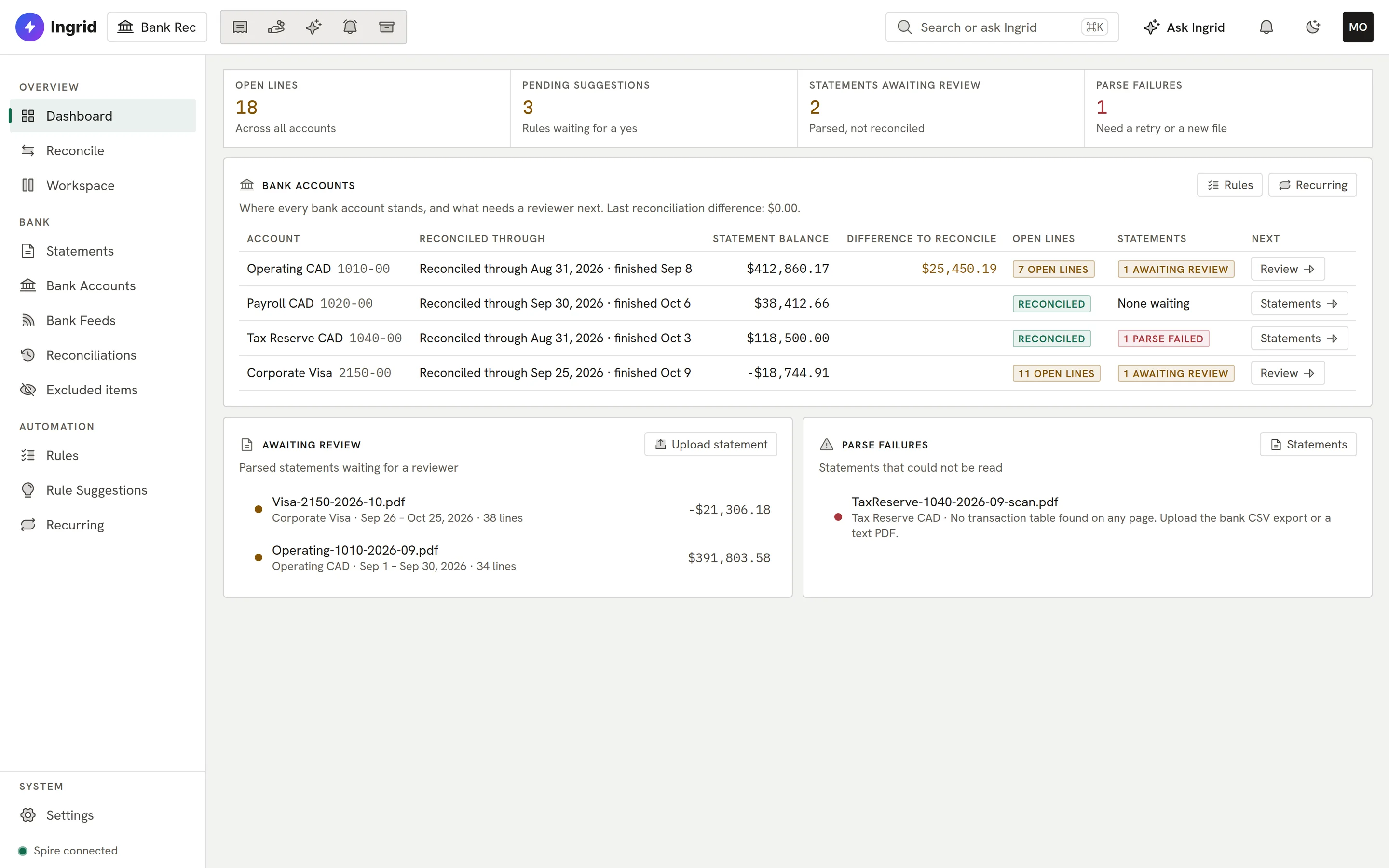
    Bank Rec dashboard.
  2. 02 Match

    A match, with its reasons.

    Same amount, same payee, cleared a day after it was issued: every proposed match shows why, and the difference it leaves.
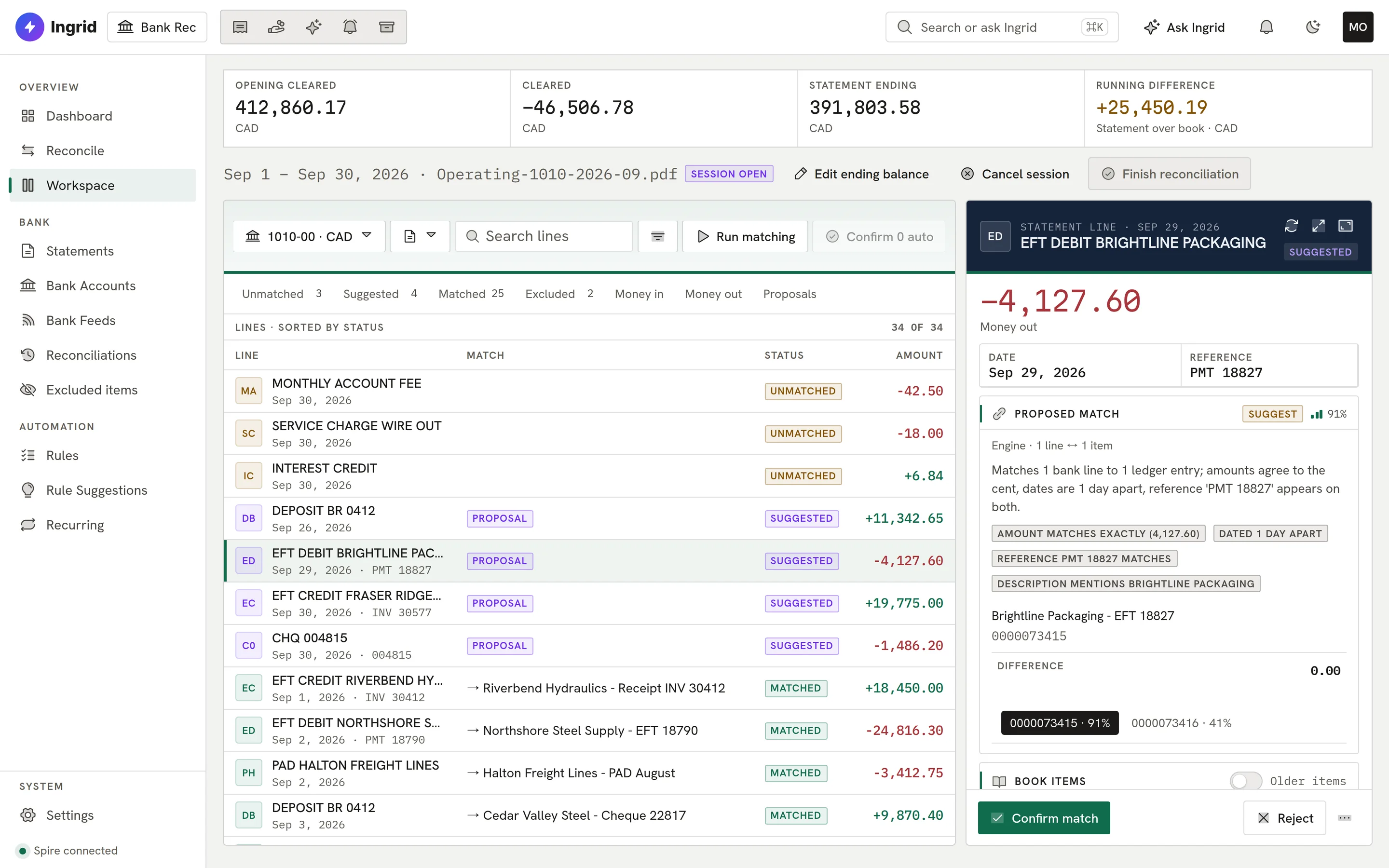
    A proposed match with reasons.
  3. 03 Candidates

    Ranked when it’s not obvious.

    When more than one entry could fit, candidates are ranked with scores and reason tags, and you pick.
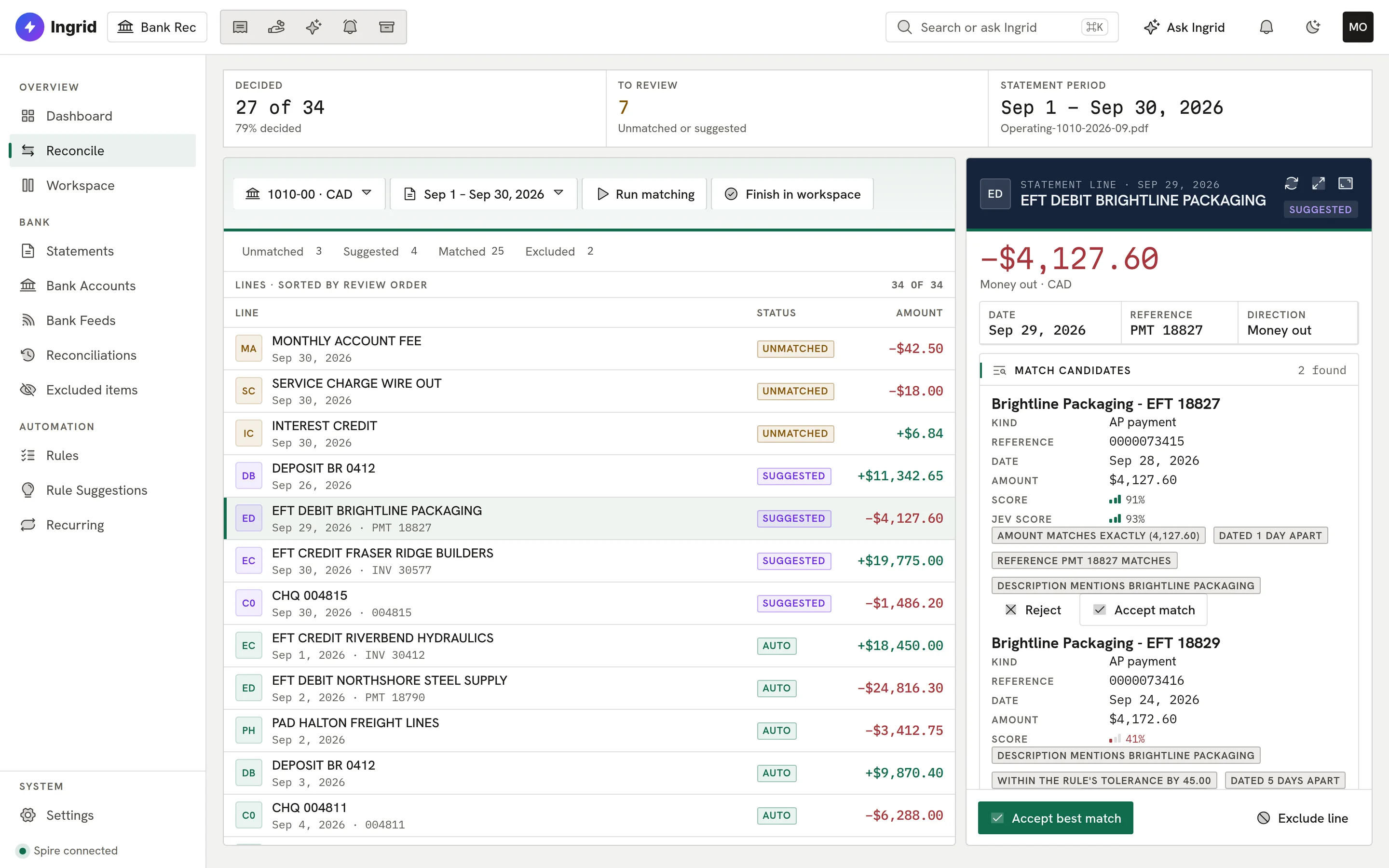
    Ranked match candidates.
  4. 04 Record

    Missing entries, previewed first.

    A bank fee becomes a journal you can read line by line before anything is posted to Spire.
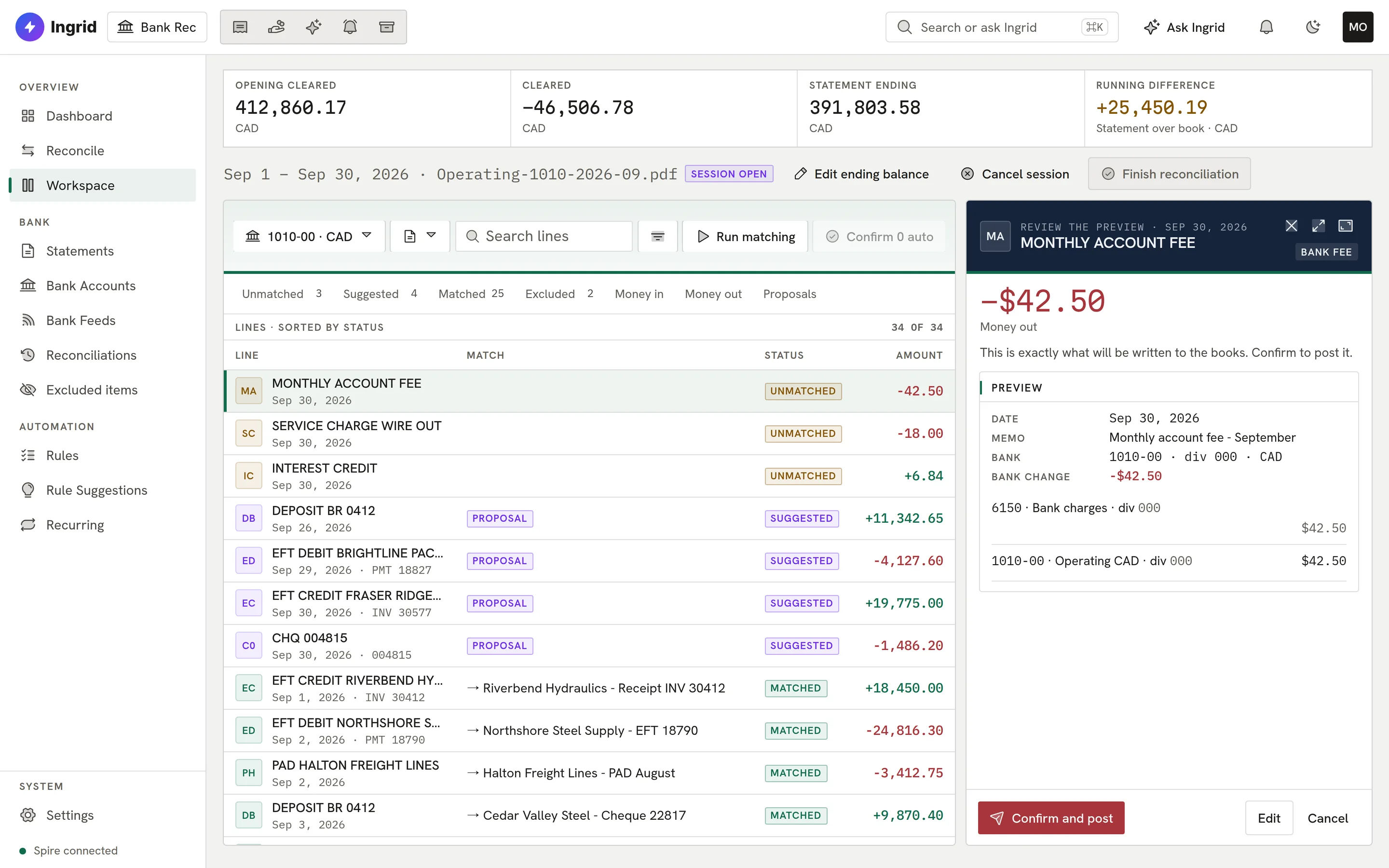
    A bank fee journal before posting.
  5. 05 Rules

    Rules you can test on the past.

    Preview a rule against past lines before it runs. Auto-post needs an administrator’s approval, caps and a kill switch.
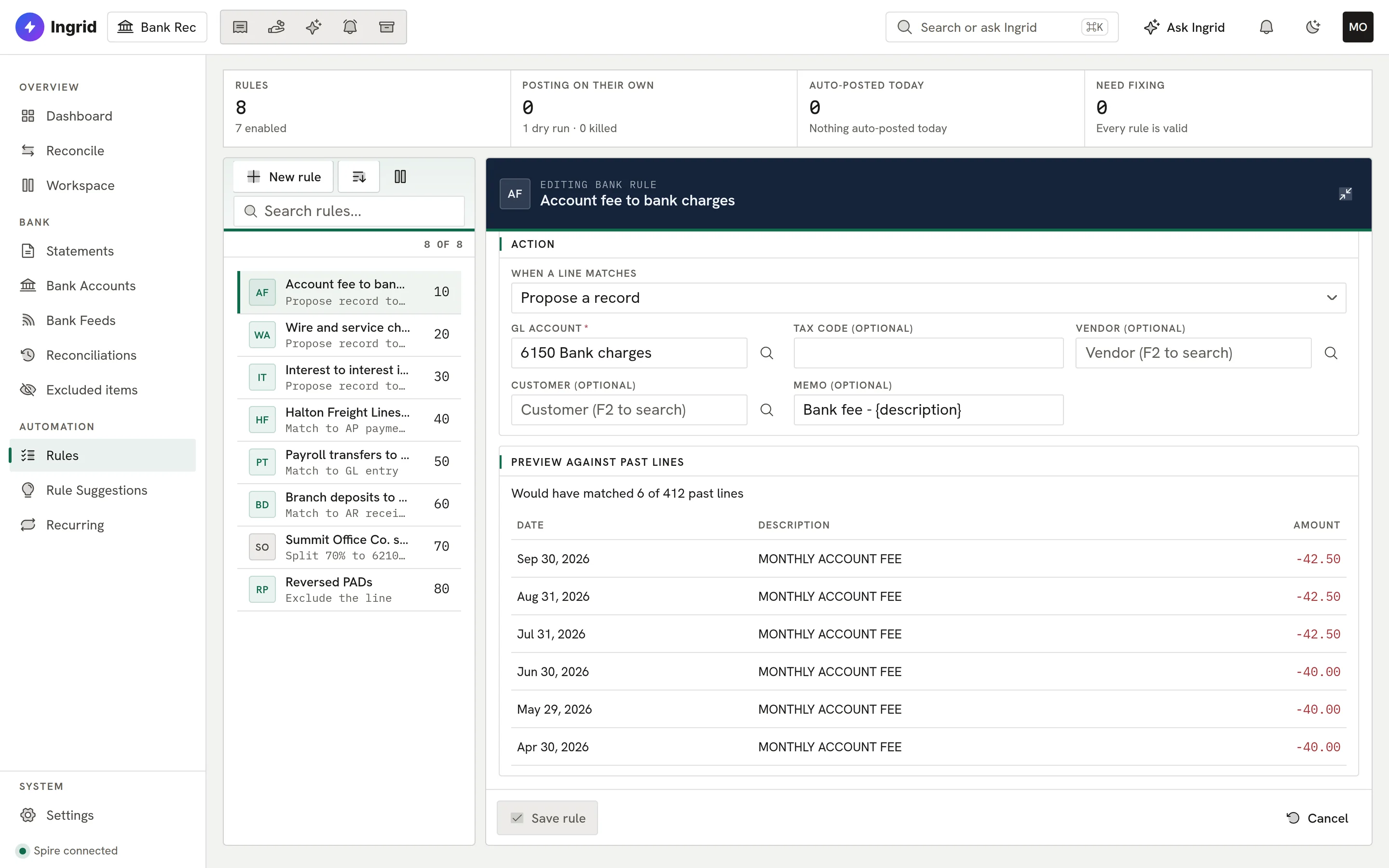
    A rule previewed against past lines.
  6. 06 Finish

    Finished at exactly 0.00.

    A session finishes only at zero. Reopening needs an administrator and a written reason; each month has a PDF report and audit trail.
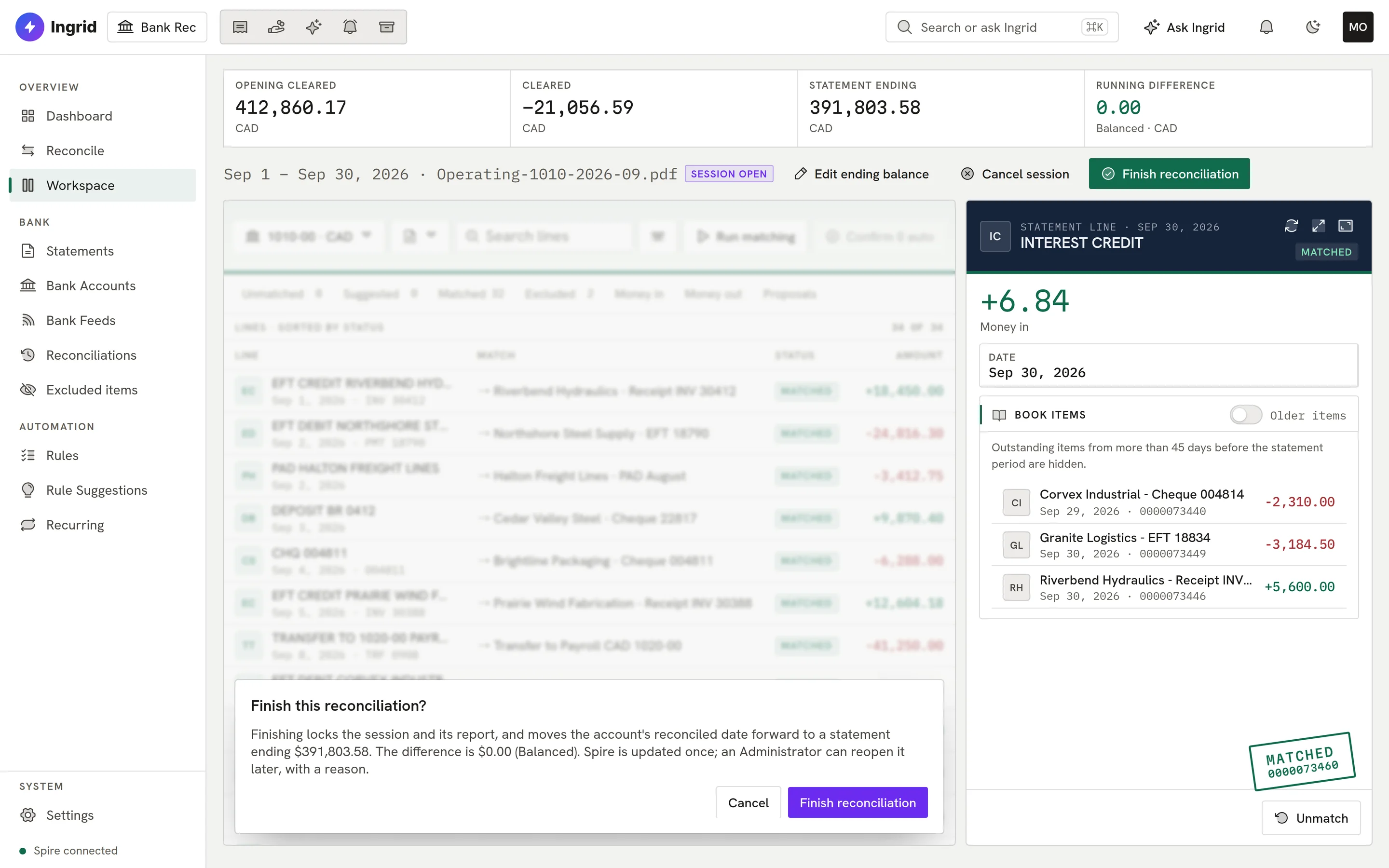

    Finishing a reconciliation at 0.00.
bankrec.ingrid-app.com/workspace
Bank Rec dashboard.
Playground

Reconcile a month. Right here.

The real Bank Rec screens with a sample month. Confirm matches, record the fee, and finish at zero.

bankrec.ingrid-app.com/workspace
A proposed match

This is the real Bank Rec screen running in your browser with sample data. Click anything; nothing is saved and nothing leaves the page.

Built for month-end

Careful where it counts, quick everywhere else.

Matching is deterministic first; nothing reaches your books without a person.

  • Any statement

    CSV, OFX/QFX, QBO, BAI2, CAMT and text. PDFs are read by Ingrid and must balance to the cent.

  • No duplicates

    Duplicate and overlap protection, so a re-import never creates a second line.

  • Explained matches

    Scored rules, group matches and the reasons for every match.

  • Confirmed postings

    Fees, interest, journals, transfers and card expenses, previewed and posted once.

  • Lost replies handled

    If Spire’s reply is lost, Bank Rec reads the books back instead of posting again.

  • Rules that learn

    Rule suggestions from how people code lines, and recurring transactions detected.

  • Sealed months

    Finished reconciliations are sealed; reopening needs an administrator and a reason.

  • Reports

    A PDF report, CSV exports and an audit trail for every session.

Everything Bank Rec does

The complete list. No asterisks.

All 67 capabilities, each checked against the product as it ships today. Anything still being built is marked.

Showing 67 of 67 features

Statements and feeds11

  • Six statement file formatsUpload CSV, OFX/QFX, QBO, BAI2, CAMT.053/052 or plain-text statement files; the format is detected from the extension and content.
  • PDF statements read by IngridA PDF statement (text or scanned) is read by Ingrid, then every amount is converted from the printed text and proven before any line is written.
  • Balance proof on every statementOpening balance plus all lines must equal the closing balance, in whole cents, or the statement is refused.
  • Multi-account filesA BAI2 or CAMT file holding several accounts is split per account and each statement is placed on the right bank account, refusing when the account is ambiguous.
  • Duplicate and overlap protectionRe-importing a file, overlapping periods, or the same transaction arriving by file and by feed never creates a second line.
  • Original file keptThe uploaded statement file is stored, de-duplicated by checksum, and parsing is a separate step so a parse failure never loses the file.
  • Discard a wrong uploadA statement nothing has been cleared or posted from can be discarded with a reason; the discard is audited.
  • Live bank feeds via PlaidConnect US and Canadian bank accounts through Plaid; new transactions arrive by webhook and a 15-minute safety-net sync.
  • Feed health and reconnectEach connection shows its health, can be reconnected in place when the bank asks for re-authentication, resynced, mapped to a bank account, or disconnected.
  • Protected feed credentialsFeed access tokens are kept protected per company and are never shown or logged.
  • Statements filed in Ingrid VaultUploaded bank statements are registered with Ingrid Vault, and Vault is told when one is discarded.

Bank accounts and books05

  • Register bank and card accountsPick a bank account from the book's chart, mark it as a bank or card account, and archive it when it is no longer used.
  • Spire booksBook items are pulled from Spire through the Ingrid data connector into a stored snapshot, and postings go back through the connector relay.
  • AP and AR as book sourcesPayments, cheques and drafts from Ingrid AP and receipts, deposits and remittance batches from Ingrid AR are read in as match candidates.
  • One cash movement, one book itemA Spire AP payment or AR receipt and the GL row it posted are folded into one item so money is never shown twice.
  • Book vs GL warningWhen the book's GL balance does not tie to the carried statement balance less uncleared items, the gap is shown with a plain explanation.

Matching09

  • Deterministic matching firstRule scoring on amount, date, reference and payee ranks book candidates for each line; near-certain one-to-one matches are accepted automatically.
  • Group matchesProposes one-to-one (with fees, tolerance, partial and over-payment), one-to-many (deposit batches, remittance references) and many-to-one groups.
  • Confidence bandsEvery proposal is banded AUTO or SUGGEST, with company-set thresholds; low-confidence guesses are hidden.
  • A second opinion for ambiguous casesOnly proposals in the ambiguous band get a second opinion from Ingrid, with account numbers hidden; it adjusts confidence but cannot invent a match.
  • Matches that explain themselvesEach proposal carries reason chips saying why it matched and where it differs.
  • Card payment to card statementA bank payment of a credit-card statement is linked to that card statement as a unit.
  • Manual matching with live differenceSelect bank lines and book items by hand and see what the match would leave before confirming.
  • Confirm, reject or undo matchesAccept or reject proposals one at a time or in bulk, and undo a confirmed match while the period is open.
  • Exclude and restore linesLines that do not belong in the reconciliation can be excluded with a reason and later restored from the Excluded items list.

Recording to the books11

  • Prepare, preview, confirmEvery write is prepared, previewed exactly, and sent only after a person confirms; a changed preview must be confirmed again.
  • Never posted twiceEach record has an idempotency key and a lease; if a reply is lost it is parked and checked by reading the book back, never re-sent.
  • Record fees, interest and journalsLines with no book entry can be recorded as a bank fee, bank interest, or a GL journal with split offsets.
  • Bank-to-bank transfersA transfer between two of the company's bank accounts is recorded as one journal.
  • FX transfers (CAD and USD)Transfers between a home-currency bank and a USD bank are paired across statements and offered as an FX journal with the gain or loss, the way Spire books it.
  • Card expense coding in bulkCode many card lines with one preview; each line is still its own write.
  • AP payments and AR receiptsRecord a vendor payment or customer receipt in Spire, or apply an existing one, from a bank line.
  • AP invoice draftsA bank line can become a draft invoice in Ingrid AP, created through AP's own service, never by changing AP’s records directly.
  • Suggestions with approvalSuggested GL journals, AP invoice drafts, AR receipts and FX transfers wait for a person to approve them before anything runs.
  • Read-back verificationA posting is marked done only after Bank Rec finds it in the book.
  • Reverse a recordA posted record can be reversed through the same confirmed pipeline.

Rules and learning07

  • Rule builder with previewBuild rules on description, reference, merchant, cardholder, amount, direction, account and day of month, and see how many past lines they would have matched.
  • Rule actionsA rule can propose a record, steer matching, split a line by percentage, or exclude it.
  • Auto-post only when approvedA rule posts unattended only after an Administrator approves it, within per-line, daily-count and daily-amount caps, with an optional dry-run period.
  • Kill switch and reversible auto-postsAuto-post can be killed or revoked with a reason, and every auto-post is audited, listed per rule and reversible.
  • Learns from your codingHow your team codes each payee is tallied, with recent decisions weighted more, and raises the confidence of future suggestions.
  • Suggested rulesRepeated coding produces rule suggestions you accept or dismiss; an accepted suggestion starts disabled and not approved for auto-post.
  • Recurring transactionsRecurring payments and deposits are detected, their next date and amount forecast, and flagged when overdue, missed, late or changed in amount.

Close and audit07

  • Reconciliation sessionsStart a session for a statement, clear items, and finish only when the difference is exactly 0.00.
  • Sealed periodsA finished session is sealed; its cleared lines cannot be re-matched, un-matched or excluded.
  • Un-finish with a reasonOnly an Administrator can reopen the latest session, with a written reason kept in the audit trail.
  • Reconciliation report PDFEach finished session has a PDF report rendered from the snapshot frozen at finish, so a reprint is identical.
  • Outstanding items and audit CSVExport outstanding items and the session audit trail as CSV.
  • Audit trailMatches, clears, finishes, un-finishes, records and auto-posts are written to an audit trail viewable per session.
  • Mark reconciled in SpireOptionally set Spire's own reconciled flag on the cleared entries at finish, and clear it at un-finish, with retry if the ledger step fails.

Workspace and dashboard07

  • Side-by-side workspaceStatement lines and book items side by side with a sticky running difference in whole cents, filters, and the record panel.
  • Keyboard-firstj/k to move, x to select, m to match, a to accept, / to search, ? for the full key map.
  • DashboardUnmatched lines, open statements, pending suggestions, matches this period, variance and last reconciled date.
  • Connector status bannerShows whether the company's data connector is reachable and how fresh the book data is.
  • Vendor, customer and GL pickersSearch vendors, customers and GL accounts when coding a line.
  • UI Next interfaceEvery Bank Rec screen also exists in Ingrid's newer UI Next design.
  • Phone width and offline bannerScreens are checked at phone width, and an offline banner appears when the connection drops.

Ask Ingrid03

  • Ask Ingrid panelThe Ask Ingrid panel is built into the Bank Rec screens.
  • Questions about your reconciliationIngrid can answer reconcile status, unmatched lines, match proposals and statement summaries from Bank Rec's stored data.
  • Confirmed actions from chatIngrid can prepare a match or a fee, interest or journal record; it runs only after you confirm, through the same checks as the screen.

Security and control05

  • Four rolesAdministrator, Poster, Clerk and Viewer: posting needs Poster, approving auto-post and un-finishing need Administrator, Viewer is read-only.
  • Per-company app accessSign-in checks that the user has access to Bank Rec in that company; users in several companies pick one.
  • Your data stays separateEvery Bank Rec table is company-scoped with company separation.
  • Works with Ingrid offFile import, matching, recording and closing all work without Ingrid; Ingrid only reads PDFs and judges ambiguous matches.
  • Company settingsSet match thresholds, second opinion on/off, default bank-fee, interest and suspense accounts, default division and the Spire reconcile-flag switch.

ERP support02

  • Works with SpireReads from and, where the app writes, posts to Spire.
  • AccountMate supportComingAccountMate support is coming soon.

Close the month at zero.

Bring a statement and your Spire company. We will show you how Bank Rec matches it.

Book a demo